

How Does a VPN Protect Your Online Privacy?
Zafruddin Shaik
VPN
Published on
5 min read
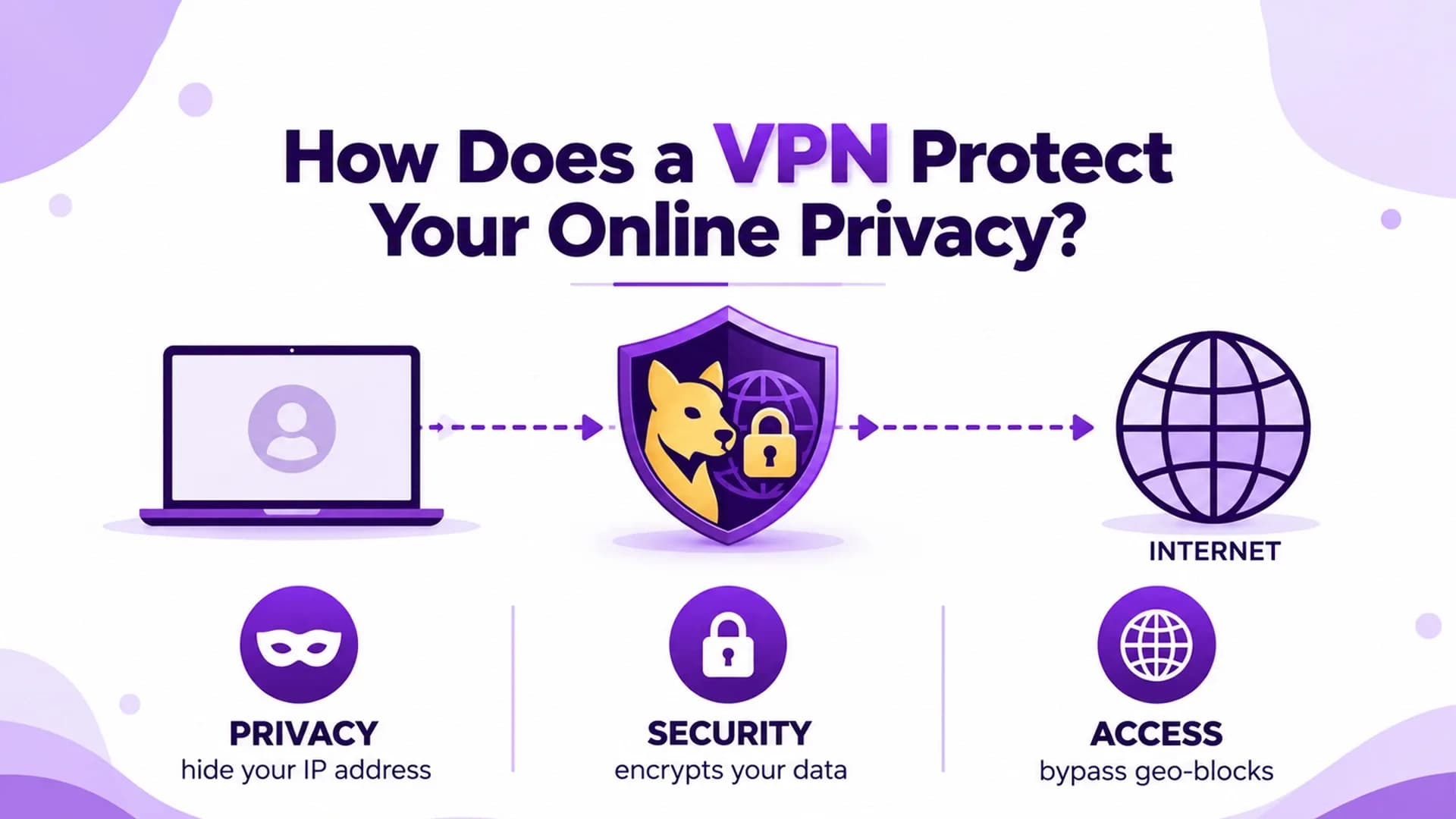
Every time you browse the internet, use an app, or connect to public Wi-Fi, your online activity can expose certain information about your connection. Your internet service provider may see details about your internet traffic, while websites can collect information such as your IP address, browsing behaviour, and device data. A Virtual Private Network (VPN) can help improve your online privacy by encrypting your internet traffic and routing it through a VPN server. However, understanding what a VPN protects—and what it does not—is essential to making informed decisions about your digital security.
What Is Online Privacy, and Why Does It Matter?
Online privacy refers to how your personal information and internet activity are collected, shared, and used while you browse the web. This information may include your approximate location, browsing habits, IP address, and details you provide when using websites or online services. Protecting your privacy can help reduce unnecessary exposure of your information, particularly when using unfamiliar networks or accessing sensitive accounts. Although no single tool can eliminate every online privacy risk, a VPN can provide an additional layer of protection.
How Does a VPN Protect Your Online Privacy?
1. It Encrypts Your Internet Traffic
One of the main ways a VPN supports online privacy is through encryption. When you connect to a VPN, your device establishes an encrypted connection to a VPN server. This helps prevent people monitoring the network from easily reading the contents of your protected traffic. Encryption is particularly valuable when using public Wi-Fi in places such as cafés, hotels, airports, or other shared environments. However, encryption does not make every online activity invisible. Websites may still collect information you submit, and the VPN provider can potentially observe certain connection data depending on its technology and privacy practices.
2. It Hides Your IP Address from Websites
Your IP address helps identify your internet connection and can reveal information about your approximate location and internet service provider. When you connect through a VPN, websites generally see the VPN server's IP address instead of your original public IP address. This can make it harder for websites to associate your browsing activity with your usual network address. However, VPN IP address masking does not make you completely anonymous. Websites may still recognise you through cookies, account logins, browser fingerprinting, or other tracking methods.
3. It Helps Protect Your Privacy on Public Wi-Fi
Public Wi-Fi networks are convenient, but you may not always know how securely they are managed. A VPN encrypts traffic between your device and the VPN server, helping protect that connection from certain forms of network monitoring. This additional protection can be useful when travelling or working away from home. Nevertheless, a VPN cannot prevent every threat, such as phishing websites, malicious downloads, or compromised devices. Continue using secure websites, keep your software updated, and avoid sharing sensitive information with untrusted services.
4. It Can Reduce Direct Exposure to Your Internet Service Provider
Without a VPN, your internet service provider can generally observe connection information and may be able to see the domains you visit, depending on factors such as HTTPS and DNS configuration. When you use a VPN, your internet traffic travels through an encrypted tunnel to the VPN server. Your provider can generally see that you are connected to a VPN, along with certain connection details, but it cannot normally read the contents of properly encrypted VPN traffic. This shifts some visibility from your internet provider to the VPN service, making the provider's privacy policy and data-handling practices important considerations.
5. It May Help Limit Some Forms of Tracking
Some VPN services include additional features such as malicious-domain blocking, tracker blocking, or DNS filtering. These features may help reduce exposure to certain unwanted connections. However, not every VPN includes these tools, and their effectiveness varies. A VPN by itself does not automatically block all advertisements, cookies, tracking scripts, or data collection by apps. For stronger privacy, combine a VPN with privacy-conscious browser settings, reputable security software, and careful management of app permissions.
What a VPN Cannot Hide
Although a VPN can improve online privacy, it is not a complete anonymity tool. Understanding its limitations helps you use it more effectively.
Account activity: Websites can identify you when you sign in to personal accounts.
Cookies and browser fingerprinting: Tracking technologies may recognise your browser even when your IP address changes.
Information you share: A VPN cannot protect details you voluntarily submit to an untrustworthy website.
Malware and phishing: A VPN does not automatically prevent malicious files, scams, or fraudulent messages.
VPN provider data: The service may collect certain account, payment, diagnostic, or connection information according to its policy.
A VPN should therefore be one part of a broader online privacy strategy rather than your only security measure.
How to Choose a VPN for Online Privacy
When comparing VPN services, look beyond connection speed and server availability. Consider these important factors:
- Strong Encryption
Check whether the service uses established encryption and secure VPN protocols.
- Transparent Privacy Policy
Understand what information is collected, how long it is retained, and when it may be shared.
- No-Logs Claims
Review what the provider means by its no-logs policy and whether independent assessments support its claims.
- Leak Protection
Look for appropriate DNS and IP leak protection to help prevent accidental exposure.
- Security Features
Consider a kill switch, secure protocol options, and other features suited to your needs.
Why These Features Matter
No feature guarantees complete privacy, so choose a service that clearly explains its limitations and security practices.
Final Thoughts
A VPN can protect your online privacy by encrypting internet traffic, masking your public IP address from destination websites, and reducing the visibility of your activity to other parties on your local network. However, its effectiveness depends on the service you choose, its configuration, and your own browsing habits. For better protection, combine a VPN with strong passwords, multi-factor authentication, updated software, and careful online behaviour. Understanding both the benefits and limitations of a VPN will help you make more informed decisions about protecting your personal information online.
FAQs
1. Does a VPN completely protect my online privacy?
No. A VPN can encrypt traffic and mask your public IP address from websites, but it cannot prevent every form of tracking, malware, phishing, or data collection.
2. Can my internet service provider see my activity when I use a VPN?
Your provider can generally see that you are connected to a VPN and may observe connection details. It cannot normally read the contents of properly encrypted VPN traffic.
3. Does a VPN hide my IP address from websites?
Yes. Websites generally see the VPN server's IP address rather than your original public IP address, although other tracking methods may still identify you.
4. Is a VPN useful on public Wi-Fi?
Yes. A VPN adds encryption between your device and the VPN server, which can help protect your traffic on shared networks. It does not eliminate every public Wi-Fi security risk.
5. What is the most important VPN feature for online privacy?
Strong encryption and secure protocols are important, but you should also review the provider's privacy policy, logging practices, and leak protection. No single feature guarantees complete privacy.