

VPN Kill Switch: What It Is and How It Protects You
Zafruddin Shaik
VPN
Published on
6 min read
A Virtual Private Network (VPN) helps protect your online activity by encrypting your internet connection and routing your traffic through a secure VPN server. However, even a reliable VPN connection can sometimes drop because of unstable internet, server problems, network changes, or software issues. When this happens, your device may automatically switch back to its regular internet connection, potentially exposing your real IP address. This is where a VPN kill switch becomes useful. It is a security feature designed to block internet traffic if your VPN connection unexpectedly disconnects. Understanding how it works can help you maintain better online privacy and reduce the risk of accidental data exposure.
What Is a VPN Kill Switch?
A VPN kill switch is a security feature that automatically blocks your device's internet access when the VPN connection is interrupted. Its main purpose is to prevent your online traffic from continuing through your regular, unprotected internet connection. Without this feature, your device may reconnect to the internet using your internet service provider's network if the VPN disconnects. During that period, websites and online services may be able to see your original public IP address. A kill switch helps reduce this risk by stopping internet traffic until the VPN connection is restored or you manually reconnect.
How Does a VPN Kill Switch Work?
A VPN kill switch continuously monitors the connection between your device and the VPN server. When it detects that the secure connection has been interrupted, it blocks internet traffic according to its configured settings.
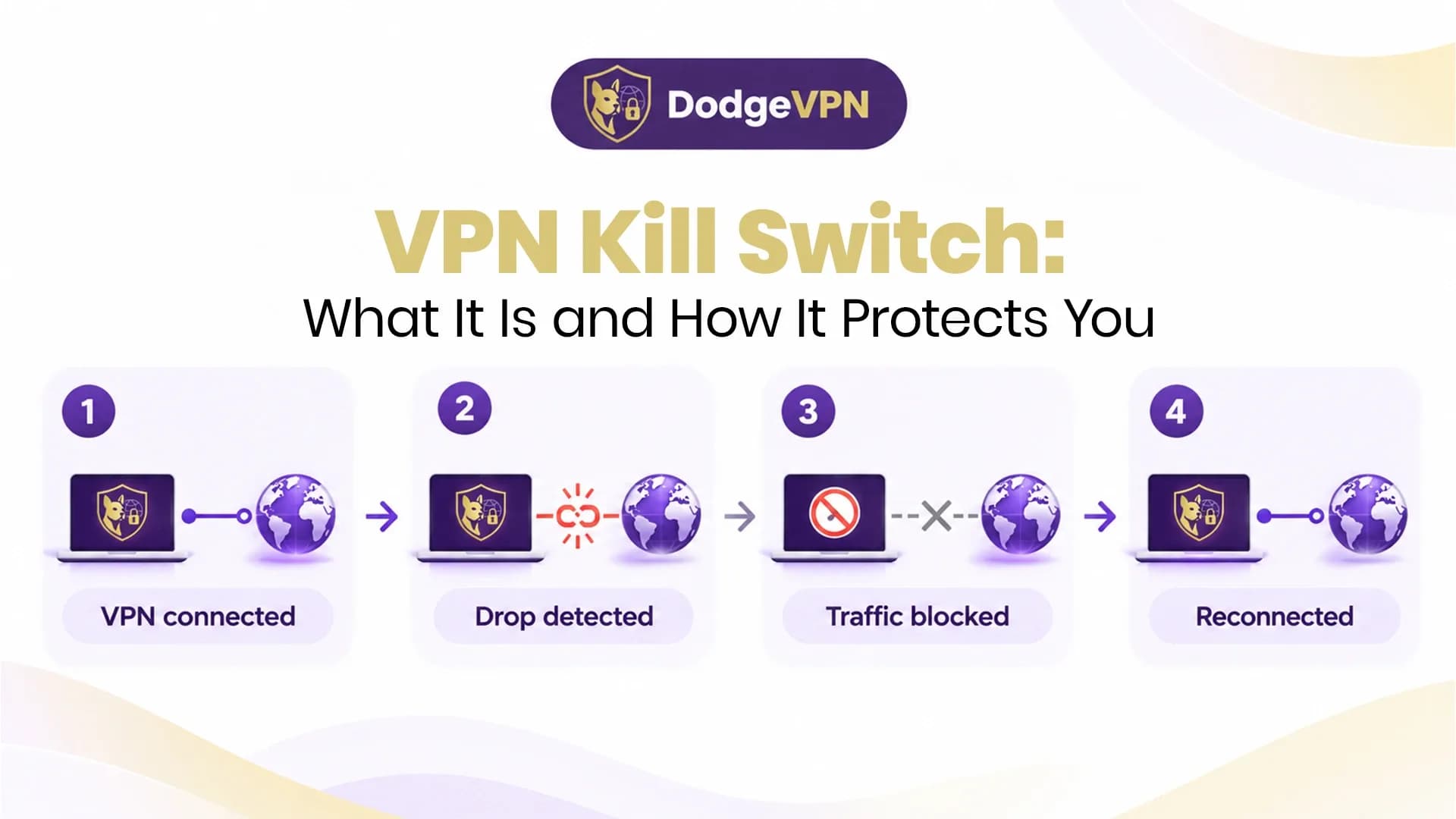
Here is how the process generally works:
- VPN connection starts: You connect your device to a VPN server, and your internet traffic is routed through the VPN.
- Connection monitoring: The kill switch monitors the VPN connection to identify unexpected interruptions.
- Disconnection detected: If the connection drops, the kill switch recognises that your traffic may no longer be protected.
- Internet access is blocked: The feature prevents your device from sending traffic through the regular internet connection.
- VPN reconnects: Once the VPN connection is restored, internet access can resume according to the kill switch settings.
This process helps prevent accidental exposure of your public IP address and online traffic during unexpected VPN interruptions.
Why Is a VPN Kill Switch Important?
A VPN connection can be interrupted for several reasons, and you may not always notice when it happens. A kill switch provides an additional layer of protection in these situations.
1. Helps Protect Your Real IP Address
When your VPN disconnects, your device may use its regular internet connection. This can expose your original public IP address to websites and online services. A kill switch helps prevent this by blocking traffic until the VPN connection returns.
2. Reduces the Risk of Data Exposure
VPN encryption protects supported internet traffic while the VPN is active. If the connection drops, a kill switch helps stop data from travelling through an unprotected connection.
3. Supports Safer Public Wi-Fi Usage
Public Wi-Fi networks in cafés, hotels, airports, and other shared locations may not always be secure. If your VPN disconnects while using one of these networks, a kill switch can help prevent your device from continuing to send traffic without VPN protection.
4. Helps Maintain Online Privacy
People who use VPNs for browsing, remote work, or accessing online services often want consistent privacy protection. A kill switch helps maintain that protection when unexpected connection interruptions occur.
Types of VPN Kill Switches
VPN services may offer different types of kill switches depending on their applications and operating systems.
1. System-Level Kill Switch
A system-level kill switch blocks internet access across the device when the VPN connection is interrupted. It generally offers broader protection because it can prevent traffic from different applications from using an unprotected connection.
2. Application-Level Kill Switch
An application-level kill switch blocks internet access for selected applications rather than the entire device. For example, you may choose to restrict a browser or another specific application if the VPN disconnects. The available options and exact behaviour vary between VPN providers and operating systems.
How to Enable a VPN Kill Switch
Most VPN applications that support this feature allow users to enable it through their settings.
Follow these general steps:
- Open your VPN application.
- Navigate to the settings or security section.
- Look for an option called Kill Switch or Network Lock.
- Turn the feature on.
- Check whether the application offers system-wide or application-specific protection.
- Save your settings and reconnect to the VPN if required.
The exact steps may differ depending on your VPN provider, device, and operating system. Some mobile and desktop applications may also offer different kill switch options.
When Should You Use a VPN Kill Switch?
A kill switch can be useful whenever you want to avoid sending internet traffic outside your VPN connection. Consider enabling it in these situations:
- Using public Wi-Fi: It can help protect your connection if the VPN drops while you are on a shared network.
- Remote working: It can reduce the risk of accidentally sending work-related traffic through an unprotected connection.
- Online gaming: It can help prevent your real IP address from being exposed during an unexpected VPN interruption, although it may temporarily disconnect your game.
- Private browsing: It can help maintain consistent VPN protection while browsing websites and using online services.
- Travelling: It can provide an additional safeguard when switching between hotel, airport, and mobile networks.
Does a VPN Kill Switch Have Any Limitations?
Although a kill switch is a useful security feature, it does not guarantee complete online protection. If your VPN disconnects, you may temporarily lose internet access until the connection is restored. Some applications may also behave differently depending on their network permissions and operating system. A kill switch cannot prevent phishing attacks, malware infections, weak passwords, or every possible privacy risk. It is best used alongside reliable VPN encryption, updated software, and good online security habits.
Final Thoughts
A VPN kill switch is an important feature for people who want consistent protection when using a VPN. By blocking internet traffic during unexpected VPN disconnections, it helps reduce the risk of exposing your real IP address and sending data through an unprotected connection. Before choosing a VPN, check whether it offers a kill switch, what type of protection it provides, and whether it supports your devices. Enabling this feature can help make your everyday internet use more private and secure.
FAQs
1. What happens when a VPN kill switch is activated?
When the kill switch detects an unexpected VPN disconnection, it blocks internet traffic according to its settings. Your internet access usually resumes when the VPN connection is restored.
2. Should I keep my VPN kill switch turned on?
Yes, keeping it enabled is generally a good idea if you want to prevent your device from accessing the internet through an unprotected connection when the VPN drops.
3. Does a VPN kill switch protect my real IP address?
It helps prevent your real public IP address from being exposed during unexpected VPN disconnections by blocking internet traffic until the VPN reconnects.
4. Can a VPN kill switch affect my internet connection?
Yes. If the VPN disconnects, the kill switch may temporarily block internet access. This is expected behaviour and helps prevent traffic from bypassing the VPN.
5. Is a VPN kill switch available on mobile devices?
Some VPN applications offer kill switch features on Android and other supported platforms. Availability and functionality depend on the operating system and VPN application.